

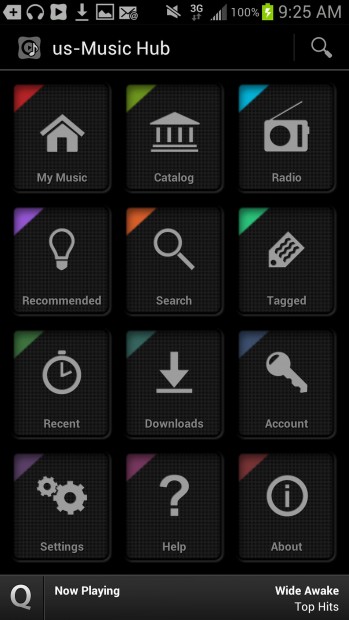
Samsung's new music service tries to combine four things into one: an all-you-can-listen plan like Spotify, a pay-per-song store like iTunes, an Internet music storage service like iTunes Match and a radio service like Pandora.
That's a great premise at a great price: At $10 a month, Music Hub promises an affordable, ad-free listening experience.
In practice, though, Music Hub can make your head spin. There are some redundant and confusing features and not everything worked properly. After trying it out for a week, I was left wondering why this was any better or worse than a pure music subscription plan.
Also, Music Hub works only on Samsung's Galaxy S III phone, which is becoming one of the iPhone's biggest rivals. But I don't believe it's an incentive to switch.
The first problem is distinguishing Music Hub's app from others. Several apps on Android devices sound alike and do similar things. This issue is compounded because several Samsung apps are meant to replace Android versions. So you'll have to distinguish between Samsung's "Music Hub" (for music) and its "Media Hub" (for TV shows and movies), and avoid Android's "Music Player," "Play Store" and "Play Music."
People are also reading…
Assuming you get past this, you then face issues that keep Music Hub from being all it could be.
On paper, combining the four types of music services makes sense. It saves you from having to go back and forth between apps and gives you a consistent user interface. Your favorite song selections move across the different services so you can get better recommendations. And if one service has a shortcoming, there's another to fill in the gap.
Subscription music plans such as Spotify and Rhapsody allow you to listen to almost any song or album you want as many times as you want for $10 a month. But it can take weeks or months for new albums to appear - notably Coldplay's "Mylo Xyloto" last year and Adele's "21" this year. Some artists, including The Beatles, hold out completely. Plus, all your songs disappear when you stop paying the monthly fee.
Download stores such as iTunes have a wider selection of music. You pay once per song or album rather than monthly, and you own it forever. But you can run up a big tab if you buy a lot of music. You may also run out of space to store songs on your mobile device.
That's where online storage lockers come in. Prominent ones include iTunes Match and Amazon.com Inc.'s Cloud Player ($25 a year each, though Amazon has a free option for 250 songs). Songs you own are stored on remote servers operated by those companies, and your device pulls them over the Internet as you're ready to listen to them.
Meanwhile, radio services such as Pandora play songs they select along certain genres, artists or styles. They learn what you like if you give songs a "thumbs up." You can discover new music this way, but can't choose the specific song or album to listen to.
When Music Hub is playing songs, all is good. The sound quality and selection are as decent as other subscription streaming plans. It works fine over standard cellular connections because it's smartly retrieving ahead of time the next song on whatever list you happen to be listening to.
Music Hub does a pretty good job of letting you discover songs and save those you like for playback, though some features seem redundant. Example: There are three different ways to essentially mark a song in a playlist.
There's a "Buy song" option, which is useful only if I'm not paying the $10 a month for premium service. Yet it still comes up if I have the subscription and the song has already been stored on the device. Furthermore, some songs go for $1.49, while the most you pay on iTunes is $1.29.
You can still use Music Hub without paying $10 a month, but it will limit songs you pick to 30-second previews and the virtual storage locker won't function. The free radio service and music store will work fine.
Here's the disturbing part.
In the paid version, Music Hub makes little distinction between subscription-only songs that you have put in "My Music" and songs you have actually purchased and put into your online locker, which is also stored in "My Music."
You lose access to subscription songs once you stop paying, but purchased songs are supposed to be yours forever.
If you buy songs from Music Hub, you'll see them in a "Purchases" section. But songs I bought elsewhere and uploaded into online storage are just jumbled together with songs that will disappear once I stop paying.
Not demarcating them clearly is unsettling.
That's like going to a keg party where everyone is given red plastic cups with their names on them. Music Hub is going around erasing those names, putting half-full cups of beer on a Lazy Susan and spinning it around. The beer will still be tasty, but it's kind of gross.
I have other niggling complaints. Music Hub's uploader program simply doesn't upload some songs (such as a two-disc album of Japanese band Southern All Stars, which Apple's iTunes Match and Google Play had no problem with). Music Hub offers lyrics, but the availability is patchy at best. And just like other streaming services, there are gaps in the artist portfolio (no songs from "They Might Be Giants," for example).
But it's the fuzziness around which Music Hub treats ownership of your songs that bothers me the most. Although I'm sure that you'll find the songs you bought somehow, the system suggests strongly that when you stop paying, that's when the music stops.