Those purchasing new computers are faced with an age-old question: Mac or PC?
In this modern world, you can’t really go wrong with either computer. It’s helpful to take note of how you plan to use your computer, to determine which machine and operating system fits your specific needs, and to get the most bang for your buck.
PC

Best PC
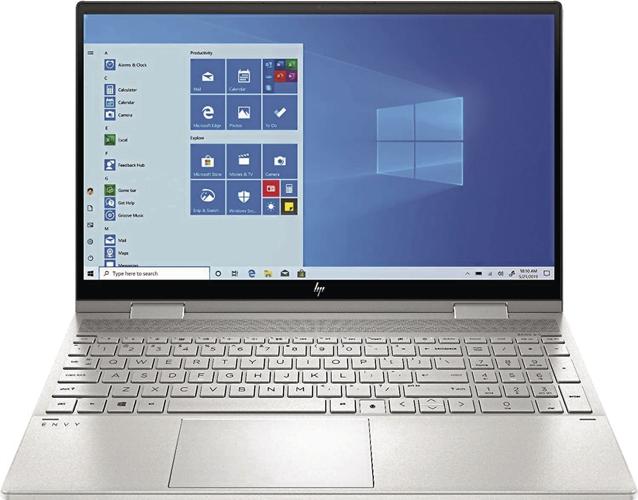
The sleek HP Envy x360 Convertible Laptop, which offers a wide range of hardware options and features an Intel Core processor. It’s hard to beat the portability of a laptop in this day and age.
PCs are more widely used than Macs, and run on Windows, by far the most used operating system in the world.
It’s tough to categorize PCs, with so many brands and models available on the market.
They offer some distinct benefits over Macs. Certain users will find PCs to be better suited for their everyday needs.
Pros of buying a PC
- The main benefit of buying a PC is its affordability and sheer number of products available.
- PCs are far more modifiable than Macs. For gamers, PCs are the better option for the better graphics cards and hardware available.
- It’s easier to navigate software modifications, software development and other internal system needs on a PC.
People are also reading…
Cons of buying a PC
- PCs aren’t as overtly user-friendly as Macs and may take more getting used to for those who aren’t already familiar with Windows.
- While PCs are more affordable than Macs, they don’t hold their resale value as well.
Mac

Best Mac
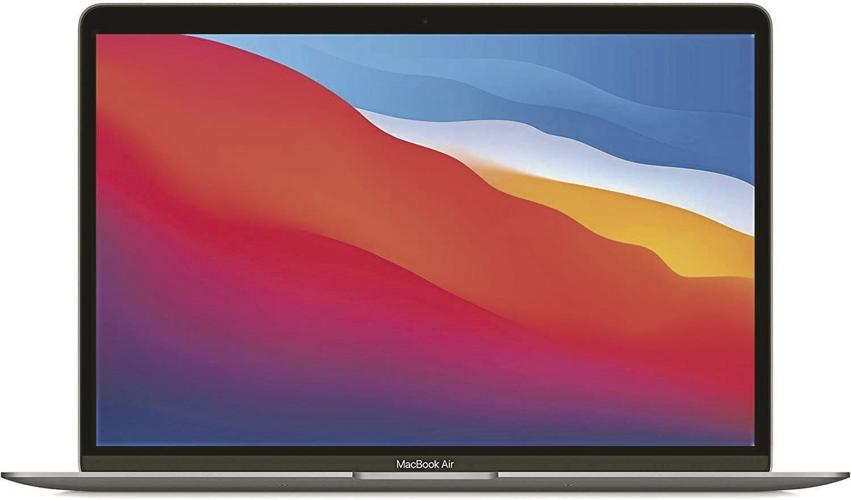
Lightweight with a long-lasting battery, the MacBook Air is an excellent balance of affordability, performance and user-friendliness.
These refer to any computer using Apple’s Mac OS X operating system.
Apple offers several computer products: iMac, Mac Mini, Mac Pro and MacBook.
The iMac is Apple’s all-in-one desktop computer, offered in 21.5-inch and 27-inch display sizes, and come with Apple’s signature Magic Keyboard and Magic Mouse.
The Mac Mini is a great compact desktop for the average household, but it is sold without a monitor, keyboard or mouse. The same goes for the Mac Pro, Apple’s ultimate performance computer, primarily intended for professional computing.
Probably the most popular of the modern Mac family is the laptop MacBook, for either the lightweight MacBook Air or the performance-level MacBook Pro.
Pros of buying a Mac
- The most commonly cited positive of Macs is their user-friendliness and approachability. Even for those brand new to computers, Mac OS tends to be more intuitive than Windows.
- Macs’ seamless integration with iPhones and iPads make it a no-brainer for anyone who already has a device in the Apple ecosystem.
- Most Macs come with high-resolution “Retina” displays, making them the better option for graphic designers, artists and others who will frequently use the computer’s visual elements.
- Macs are extremely well-designed and aesthetically appealing, offering more of an artful computer look than with a PC.
Cons of buying a Mac
- While Apple’s price range is wide, its computers tend to be more expensive than PCs for the hardware offered.
- Since Windows is the most widely used operating system in the world, there’s less software available for Macs.
Which one should you buy?
For average users and avid designers alike, buying a Mac may be the best bet, so long as you can afford to pay more.
With a user-friendly operating system and multi-device ecosystem, Macs are easy to use, approachable modern computers that allow for seamless synchronization among Apple devices.
If you like working with source code, playing games on your computer, or are looking for the best budget option, a PC is the way to go.
With a wider range of Windows-bearing products and more freedom to modify and micromanage the computer, PCs are the pick for many offices and households.
RELATED: How to help family members embrace unfamiliar technology — at any age
How to help family members embrace unfamiliar technology — at any age
Getting started

Do all your Zoom chats with Mom these days start with, “You’re on mute. The button’s lower left”?
If so, you’re part of an ever-growing group trying to help their less tech-savvy loved ones zip into Zoom, hop onto Hulu and master gadgets from a greater distance than usual thanks to the global pandemic.
Chances are, you found it a tiny bit frustrating to spend hours talking through something that you easily could have done in seconds.
I say this from my own experience. Early in the pandemic, I talked my 81-year-old mother through installing and using Zoom so she could join in a weekly familywide chat.
But the real challenge came with helping her set up an Apple TV from 3,000 miles away.
What would’ve taken five minutes in person instead required a week’s worth of phone calls and ultimately, a FaceTime encounter with the back of her TV.
The good news is that getting a Boomer on Zoom can not only be stress-free, but also life-enriching and empowering, if you take the right approach.
Here are some things to keep in mind for an effective remote tech help strategy.
Instill confidence

“Younger generations have been taught to fudge around (with technology) and hack,” says Lisa M. Cini, author of “Boom: The Baby Boomers Guide to Leveraging Technology, So That You Can Preserve Your Independent Lifestyle & Thrive.”
“This generation was not taught that at all. When you don’t comprehend it, you get scared you’ll break it,” she says.
Cini says the result is the fear that an errant button push will render the piece of technology totally useless. That’s why it’s important to underscore often that nothing they do to today’s tech gadgets will result in irreversible damage.
That’s echoed by Alex Glazebrook, director of operations for Older Adults Technology Services (OATS), a nonprofit that helps seniors make the most of the technology around them.
“(Telling them) ‘You can’t break it’ is where we start from,” he says.
“We try to really calm people’s nerves and try to make them feel like they’re in control, that they can do this.”
Take it step by step

When it comes to helping the less tech-savvy set explore a new gadget or service, both Glazebrook and Cini liken it to learning a foreign language — both literally and figuratively.
“If you think of it as a language, once (you) start talking through things you’ll realize there are a lot of little things we take for granted as a common language that are not,” Cini says.
“Simple things like ‘swipe left,’ ‘swipe right’ or ‘click on the hamburger (icon)’ that they don’t even have the capacity to understand.”
Glazebrook says approaching new technology like foreign-language learning is helpful because both are about adding to a knowledge base piece by piece over time.
“When you learn a language, it builds,” he says. “You learn nouns, you learn verbs, conjugation and then sentence structure, you build complexity.”
Make a manual
Cini says creating an easy-to-follow guide complete with photos, pointer arrows and clear, detailed instructions (even as basic as “press the enter button”) can go a long way toward flattening the learning curve and empowering people.
“If you can create a good set of step-by-step instructions, with visuals, and print it out and maybe even laminate it for them, they’ll be able to refer to it and not have to worry about remembering all the steps,” she says.
Outsource it

In the wake of the COVID-19 pandemic, many families are learning how to video chat to stay connected.
What if you lack the skills to be an IT department from afar?
That’s where organizations like OATS come in. Glazebrook says OATS’ national Senior Planet hotline is staffed with live bodies offering one-on-one technology help, completely free of charge, “whether you need to get on your first Zoom or download your Capital One banking app because you can’t go to the branch anymore and you need to deposit a check,” Glazebrook says.
Glazebrook says that at the beginning of the pandemic, the most requested assistance was with connecting via video.
Cini points out that of all the tech skills to master, Zoom has an additional upside.
“Video chats are really important,” she says. “You can see their facial expressions, you can see if they’ve lost weight.”
“And we know, scientifically, it’s very hard not to smile when someone else is smiling,” she adds. “So we have the ability to increase somebody else’s happiness just by doing a (video chat) instead of a phone call.”
Zachary Visconti is a writer for BestReviews. BestReviews spends thousands of hours researching, analyzing and testing products to recommend the best picks for most consumers.