

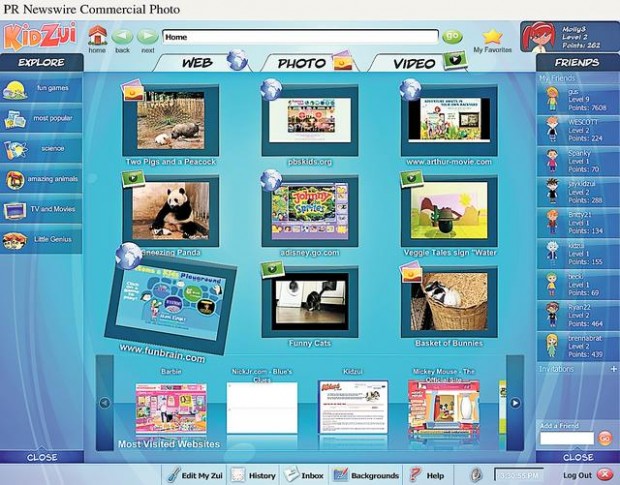
The Internet is a vast playground where children are likely to spend as much time this summer as at an actual park with swings and slides.
Yet parents fear children will stumble upon the Web's seamier side when they aren't looking. I've been testing a new Web browser that offers a nice solution.
It's called KidZui (KidZui.com), and in my tests with two boys, 4 and 9, they have freedom to surf while parents can be assured children won't find content they (and mom and dad) may not be emotionally ready to handle.
The KidZui application is downloaded onto a computer (Mac or PC) and targeted at children between 3 and 12. The content your child sees and discovers is preapproved by parents and educators.
If your child tries to open a Web site or watch a video that hasn't been approved, he won't be allowed. He can ask for permission, which, if the content is deemed appropriate, could be granted within an hour. Or Mom can allow access to a site she deems appropriate.
People are also reading…
"We don't want to be gods or the final arbiter, so parents can add or subtract content as they wish," said Cliff Boro, KidZui's chief executive. "We provide the baseline, and it's a huge baseline."
Indeed. That's why I suggest parents of preteens consider KidZui. The browser has access to more than 600,000 child-friendly Web sites, videos and pictures. That's up from 500,000 when it launched in March.
Hitting 4-year-old's funny bone
My two testers, my 4-year-old son and our 9-year-old neighbor, have spent considerable time on the site. But it's important to note each had a different experience, guided to content deemed age-appropriate.
For instance, my son laughed so hard over a video called "Charlie bit me" that my wife took a look.
The video features a 3-year-old boy holding his year-old baby brother, Charlie, who bites his big brother playfully at first but with increasing pressure as the clip continues.
By the end, the older boy is practically crying in pain. "Charlie bit me!" he yells, as his baby brother falls over laughing.
My son can relate because we have a soon-to-be year-old girl. She has bitten his finger. And as one does with children, we watched that funny little home video repeatedly. My son laughed harder with each viewing.
"Charlie bit me" first appeared on YouTube, where an editor found it and made it available on the KidZui browser. This is an important step because the usual YouTube content surrounding a video — comments and links to related videos — are not included. Comments, for instance, are often not child-friendly, so this is a measure of safety parents will be pleased about.
When our neighbor signed in, KidZui fed him content appropriate for a 9-year-old boy. The videos he was offered featured superheroes, local sports teams and games.
He likes professional wrestling, so he typed WWE.com in the search bar, but KidZui would not allow him to access the World Wrestling Entertainment site. That's good because if you look at that site, there are more pictures of scantily-clad "divas" than the cartoonish wrestlers.
Our neighbor also was interested in the recent local weather as news coverage has been filled with tornado damage. He found a lot of tornado content, from storm-chaser videos to Web sites that explained why they happen. There were related weather links, where he was fascinated by a document on how hurricanes are named.
I'd call that a positive Web experience.
How to sign up your kids
To sign up, first download the KidZui application to your computer. On both a Mac and a Windows-based PC, the download took only a few moments.
Then your child will be asked to create an avatar — or Zui — that will be his or her online image. The child creates a name for his Zui and a password. You can sign up more than one child, and each gets a password.
Then a parent must provide an e-mail address where a confirmation is sent. A child cannot sign up without a parent's permission. Parents provide a password, too, and this will activate the account as well as provide access to a parents-only site where you can see what your child is viewing.
All of the above is free.
But if you want more details on your child's surfing activity, the cost is $5 a month. That's probably worth it, at least initially. While I was always with my son while he surfed, I was not with our neighbor. But I know exactly where he went. It was all fun — Disney sites, PBS children's content, even a gaming site that builds math skills.
The premium account also allows for more self-expression. Children have more Zui clothing choices, for example, and can change the theme of the home screen.
When KidZui launched in March, it was a paid-only site.
It switched to the hybrid free/pay model earlier this month. Boro said there has been a profound uptick in users — free and paid — since the switch.
It may be some time before I let my son play with the computer by himself anyway — mostly because I fear he will break it — but I find it comforting that when the weather turns foul and our neighbor can't get to a real playground, I know what he'll be doing.
How it works
The KidZui browser, which is downloaded onto a Mac or PC, is aimed at children between 3 and 12.
KidZui has access to more than 600,000 child-friendly Web sites, videos and pictures.
The site will block Web sites and content that have not been approved, pending further review or a parental override.