


Buying high-tech gifts is really hard. It's almost impossible to keep abreast of the latest gadgets and know which ones are getting long in the tooth.
Deals are everywhere nowadays. Yet the frenzy is also clearing shelves to make way for next year's models.
Here are some ideas for forward-looking gadgets. Some have been around for a while and others are bleeding-edge. But they all point toward technology trends that will become more mainstream in the next few years.
Just make sure you keep the receipt.
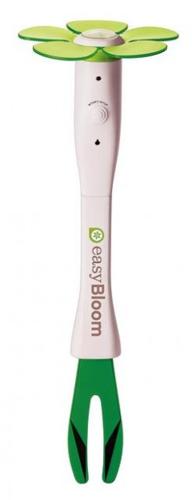
EasyBloom Plant Sensor
Coming trend: Sensors everywhere.
If you're uncomfortable with traffic cameras on the street corner, just wait. The world steadily is being outfitted with millions of digital sensors monitoring, measuring and reporting all sorts of information to the Web. These range from security cameras to devices that can notify car companies when your brake pads need replacing.
People are also reading…
Microsoft and others are developing new types of software and computers to process the flood of information all these gadgets will produce.
What it does: Introduced last month, the EasyBloom is a device that you put into the soil to collect environmental data. After 24 hours, you plug it into a computer's USB port and the data are uploaded to a Web site that analyzes the temperature, sunlight and moisture, and recommends plants that will do well in that location. It can also be used to monitor conditions for an existing plant.
EasyBloom's manufacturer, San Francisco-based PlantSense, says it's bringing technology used by greenhouse operators to amateur gardeners.
In a recent test, EasyBloom collected 129 data points over about 30 hours and then suggested 321 plants. Some were duplicates — a bunch of daffodils and tulips, for instance — but the suggestions included plants that have done well in the test location.
The recommendations come as an illustrated list, which you can click through to get more information about particular plants.
Shopping tip: The $59.95 gadget captivated the gardener in my house. It's a little expensive; perhaps neighbors or garden-club members could share them?
Cautionary note: Be sure to follow the instructions. The first time I tried it, I pushed the start button too many times and had no data after waiting 24 hours. It worked fine the second time.
"Wii Music"
Coming trend: Digital teachers.
For better or worse, video games are creeping into school curricula. How much time students spend with computers versus real teachers is an open question. While that's being debated, new programs are being developed to deliver lessons, monitor student progress and provide reports to teachers and parents.
What it does: "Wii Music" lets you "play" more than 60 instruments, alone or in jam sessions with other players and animated on-screen musicians. Performances can be saved as "music videos" and shared online. Mini-games test pitch and timing. Best of all is "Mii Maestro," which lets you conduct orchestras with the remote — a standout Wii experience.
"Wii Music" feels more like an instructional tool than a game. Animated characters called "Tutes" teach melody and tempo, and encourage players to have fun experimenting. A lesson introducing arrangements has you play "Twinkle, Twinkle Little Star" with a group of Tutes, then play rock arrangements of the song.
Learning is reinforced by collaboration, sharing and rewards.
Tomorrow's students should hope their educational software is this good.
Shopping tips: It's available for $42 to $50. A few instruments use the Wii Balance Board accessory, but you really don't need it for "Wii Music."
Cautionary note: Teens and hard-core gamers will probably sneer at "Wii Music." They'll want the latest version of "Rock Band" or "Guitar Hero" instead. But it's great for the elementary and AARP sets.
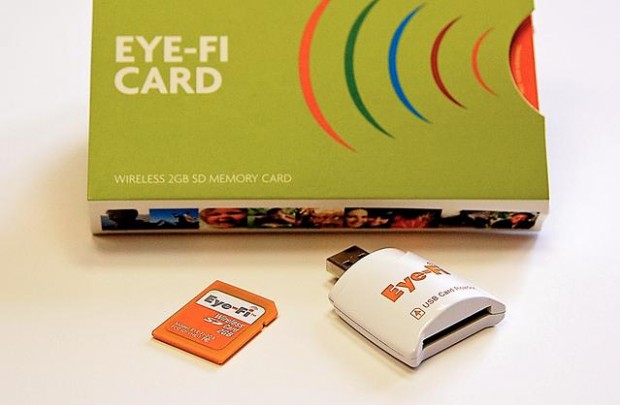
Eye-Fi wireless SD memory card
Coming trend: Decent wireless cameras.
Eventually we'll all have smart phones with high-resolution cameras and slick software that automatically uploads images to our computers and Web sites. The iPhone, T-Mobile's G1 and some other devices can do this now, but they have poor cameras.
Until they take better pictures, you can make your camera more computery, with a simple gadget that adds a Wi-Fi radio to any camera with an SD memory-card slot.
What it does: When you substitute an Eye-Fi for a regular memory card, then configure the setup with Eye-Fi's software, it will automatically upload images to your computer and Web services such as Shutterfly, Flickr or even Costco's photo-printing service.
Shopping tips: Eye-Fi cards range from $80 to $130. The $80 model only connects a camera to a computer. I'd get the $100 "Share" model that lets you upload pictures to Web sites.
The $130 model adds automatic geotagging and a year of access to Wayport Wi-Fi hot spots at places like McDonald's; it will cost $15 a year to renew the Wayport service.
Cautionary note: A new 4-gigabyte anniversary model (instead of the usual 2 gigs) — and falling memory prices — suggest the whole line will be upgraded to 4 gigs pretty soon.
A spokeswoman wouldn't confirm my suspicions.
Kingston 32 GB DataTraveler 150 flash drive
Coming trend: Vast storage in your pocket.
Soon you're likely to be carrying a tiny gadget in your pocket that can store more information than your past 10 computers.
The price of storage devices is falling dramatically. Portable 500-gigabyte hard drives are now under $100.
Cheaper yet are flash memory drives. They're the equivalent of floppy disks — so cheap that when you go to tech conferences nowadays, booths have bowls of thumb drives to give away like candy.
What it does: Because storage devices are so cheap and popular, you'll need something extraordinary to get more than a yawn when the wrapping comes off on Christmas morning.
At the cutting edge of the declining price curve are 32-gigabyte "thumb" drives like the Kingston model, which can be found for about $50. The capacity, enough to store a closet full of record albums or a small pickup full of snapshots, should impress even geeky friends.
These are also cheap insurance for people who aren't careful about backing up files — stick one in a USB slot, drag files to the drive and put it in a safe place.
Cautionary note: Comparison-shopping pays off. Remember that prices will come down as bigger models are introduced, but some stores are quicker to keep pace.