

Cell phones keep getting sleeker and smaller, which means they are also getting easier to lose or misplace. For instance, Motorola's latest model, the SLVR, is so thin and light, you'd hardly notice if it slipped out of your pocket or purse.
And, of course, losing your cell phone can be a disaster, because it contains your address book. In fact, it often contains the only copy of your address book. Except for a few smart phones, like the Palm Treo, most cell-phone models — especially the small ones that are easiest to lose — don't synchronize with your computer to back up data.
So, how can you back up your data to protect against losing your phone?
Most of the big-name phone carriers offer services that will store your cell-phone contacts for a relatively small monthly fee. But these services, which are designed in part to keep you tied to a carrier, aren't widely used or even well known to most users.
People are also reading…
There are also various carrier-independent backup software products out there, but they involve the use of a computer and can be clumsy and complicated. Some use cumbersome cables to attach your phone to a PC, others use your phone's messaging capabilities or Bluetooth functionality to send data onto a nearby hard drive.
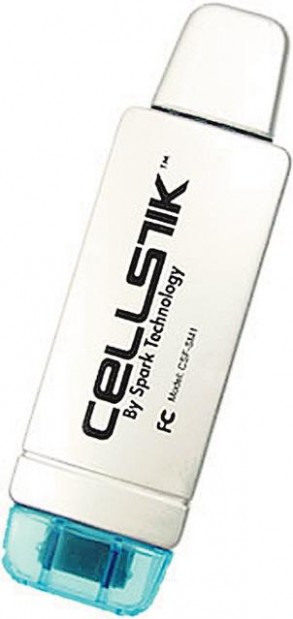
But recently, we took a look at a new product from Spark Technology Corp. in San Jose, Calif., that eliminates the need for a computer altogether: CellStik. This $40 product is a pocket-size USB thumb drive with a cell-phone adapter on one end and a USB adapter on the other. By plugging the phone adapter into your cell phone and pressing a button on the CellStik, you can have your contacts backed up on the device in just seconds — problem solved.
In our tests, we found CellStik to be a smart solution that really works, and it's about as easy to use as possible. We did have one problem with it, but that was relatively minor compared with the potential loss of all your contact data when a phone goes missing.
While CellStik doesn't require a computer, it can optionally be used with one. The USB end of each CellStik can be plugged into a Windows PC, so you can view and edit your backed-up contacts via a simple software program. You can then unplug the CellStik and reattach it to your phone, uploading any changes.
In addition to backing up your phone's data, CellStiks can be used to transfer contacts from an old phone to a new one, but you may need to buy a separate CellStik for each phone if they differ in manufacturer or connector type, and use a PC as an intermediate device.
Six versions of the CellStik are currently available for about 70 different models of Motorola, LG and Samsung cell phones, and Spark hopes to introduce CellStiks for Sanyo, Sony Ericsson and Nokia this spring. CellStiks can be purchased online at www.sparktech.com and Amazon.com or at various retail stores.
We tested two of the three CellStik-compatible phone brands: an LG VI125 and two different Samsung SCH-A670s. Backing up the contacts from each phone took just a few seconds after we pressed an arrow-shaped button labeled "Save to CellStik" and waited until it stopped blinking green, indicating that all contacts were saved.
The CellStik software, called CellStik Central, is basic and self-explanatory, listing each of your contacts' names, various phone numbers and other data in spreadsheetlike fashion. We loaded it onto our computer from an included CD, but it's also available as a free download.
After making a few changes in our list of contacts with the convenience of a full computer keyboard — rather than using the painstaking entry process on our cell phone — we selected "Save to CellStik" in the software program, detached it from the computer's USB port and reattached it to our phone. By pressing the "Update to Phone" button, we made sure the changes were reflected on our cell phone.
We ran into one frustrating problem with CellStik: In the case of our Samsung cell phone, which has a built-in camera like most new cell phones, the pictures that we had assigned to our contacts were scrambled on the phone after CellStik was used. In two cases, instead of a friend's picture showing up on the cell-phone screen during an incoming call, a picture of Katie's mother appeared. That was pretty confusing and also made caller ID via pictures useless.
Spark Technology says this picture mix-up is a problem only with certain cell phones and that CellStik is a backup product, first and foremost, so most users would be most concerned with keeping contacts rather than getting images associated with the wrong caller.


